倒计时桌面壁纸
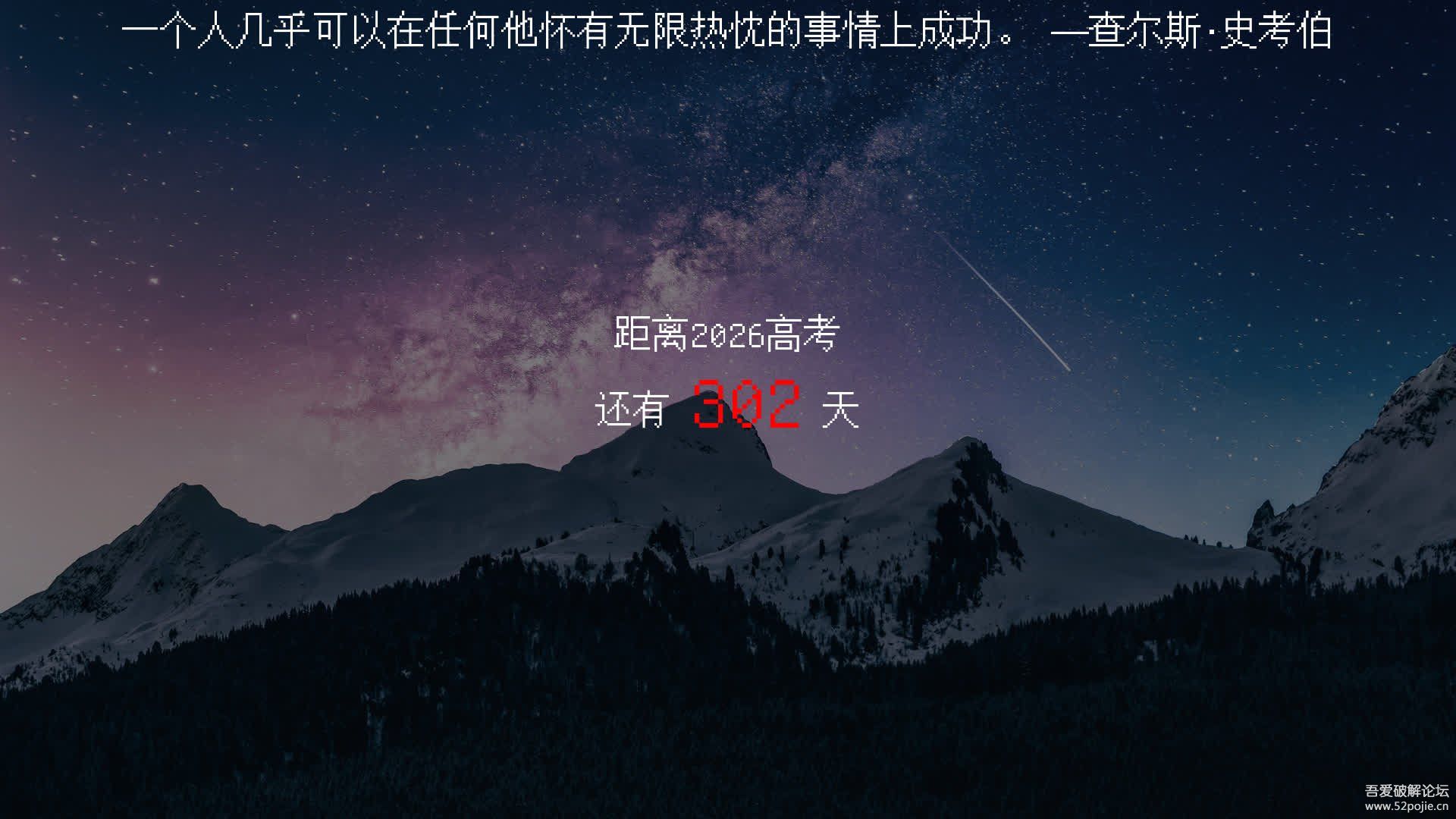
这是一个很简单的,高考倒计时程序。每次运行时,它会生成一张壁纸,中间写着“距离2026高考还有XXX天”的字样,然后将它设置为桌面背景。使用的字体默认使用unifont.ttf(个人喜好),也可以将其它字体重命名为unifont.ttf放置在同一文件夹下。使用的背景默认从bing上获取,当然也可以在同一文件夹下放置bg.png或bg.jpg或bg.bmp来指定背景。
另外,可以在同一文件夹下放置lines.txt作为励志名言表,一行一条,在壁纸最上方居中显示,每天一换。
自从中考结束后,我就编写了这个程序。如今我已经用了两年了,一直在班级的一体机上跑着。本想增加更多的联网功能,比如班主任可以使用软件在壁纸上留言,甚至云巡堂等,奈何我们学校把一体机的网络都断了,便没有动力实现这些想法……能用就行。
这里还附上一个bat小脚本,把exe文件托上去就可以设置成开机启动(在%APPDATA%\Microsoft\Windows\Start Menu\Programs\Startup\中创建快捷方式),非常方便!如果要删除开机启动的话,直接删掉创建的快捷方式就好了。
 复制代码 隐藏代码
# nuitka-project: --onefile# nuitka-project: --output-dir=build# nuitka-project: --windows-console-mode=disable# nuitka-project: --file-version=0.1.3# nuitka-project: --remove-outputfrom PIL import Image, ImageDraw, ImageFontfrom requests import getimport ctypesfrom datetime import datetime, timedeltaimport osfrom sys import exitwith open("lines.txt", "r", encoding="utf-8") as f:
    lines = f.read()

lines = lines.split('\n')

lines = [line for line in lines if len(line) > 5]def rerad(img):
    # 计算裁剪区域    aspect_ratio = 16 / 9    width, height = img.size
    new_width = width
    new_height = int(new_width / aspect_ratio)

    if new_height > height:
        new_height = height
        new_width = int(new_height * aspect_ratio)

    left = (width - new_width) // 2    top = (height - new_height) // 2    right = left + new_width
    bottom = top + new_height

    # 裁剪图像    img_cropped = img.crop((left, top, right, bottom))
    return img_cropped.resize((1920,1080))def get_font(size):
    if os.path.exists('unifont.ttf'):
        font = ImageFont.truetype('unifont.ttf', size=size)
    else:
        try:
            response = get('https://www.unifoundry.com/pub/unifont/unifont-15.0.06/font-builds/unifont-15.0.06.ttf')
            with open('unifont.ttf', 'wb') as f:
                f.write(response.content)
            font = ImageFont.truetype('unifont.ttf', size=size)
        except:
            font = ImageFont.truetype('C:\\Windows\\Fonts\\simhei.ttf', size=size)
    return font# 指定日期target_date = datetime(2026, 6, 7)# 计算天数days_left = (target_date - datetime.now()+timedelta(days=1)).daysif days_left > 999: exit()# 下载壁纸if os.path.exists('bg.png'): img_path = 'bg.png'elif os.path.exists('bg.jpg'): img_path = 'bg.jpg'elif os.path.exists('bg.bmp'): img_path = 'bg.bmp'else:
    try:
        response = get('https://bing.shangzhenyang.com/api/1080p')
        with open('bing.jpg', 'wb') as f:
            f.write(response.content)
    except:
        Image.new('RGB', (1920,1080), 0).save('bing.jpg')
    img_path = 'bing.jpg'img = rerad(Image.open(img_path))# 处理图像draw = ImageDraw.Draw(img)
width, height = img.size# 添加图层overlay = Image.new('RGBA', img.size, (0, 0, 0, 128))
img.paste(overlay, (0, 0), overlay)

font = get_font(100)
text = f'{days_left:03d}'x,x,text_width, text_height = font.getbbox(text)
draw.text(((width - text_width) / 2 + 25, (height - text_height) / 2 - 20), text, fill='red', font=font)

font = get_font(50)
text = '距离2026高考'x,x,text_width, text_height = font.getbbox(text)
draw.text(((width - text_width) / 2, (height - text_height) / 2 - 100), text, fill='white', font=font)

text = '还有'x,x,text_width, text_height = font.getbbox(text)
draw.text(((width - text_width) / 2 - 100 -25, (height - text_height) / 2), text, fill='white', font=font)

text = '天'x,x,text_width, text_height = font.getbbox(text)
draw.text(((width - text_width) / 2 + 125 +25, (height - text_height) / 2), text, fill='white', font=font)

text = lines[days_left % len(lines)]
text_width, text_height = draw.textbbox((0, 0), text, font=font)[2:4]
x = (1920 - text_width) / 2y = (1080 - text_height) / 2draw.text((x, y-500), text, font=font, fill='white')# 设置壁纸img.save('wallpaper.png')
ctypes.windll.user32.SystemParametersInfoW(20, 0, os.path.join(os.getcwd(),'wallpaper.png'), 0)
开机启动小脚本(AI写的,好用的嘞):
 复制代码 隐藏代码
@echo offsetlocal enabledelayedexpansionif "%~1"=="" (
    echo 请将需要开机启动的程序拖放到此批处理文件上
    echo.
    echo [生成的启动项仅对当前用户生效]
    pause    exit /b
)echo 正在创建用户级开机启动项...
(echo Set ws = CreateObject("WScript.Shell"^)echo startup = ws.SpecialFolders("Startup"^)echo Set shortcut = ws.CreateShortcut(startup ^& "\%~n1.lnk"^)echo shortcut.TargetPath = "%~1"echo shortcut.WorkingDirectory = "%~dp1"echo shortcut.Save
) > "%temp%\user_startup.vbs"

cscript //nologo "%temp%\user_startup.vbs"
if !errorlevel! == 0 (
    echo 成功创建启动项:%APPDATA%\Microsoft\Windows\Start Menu\Programs\Startup\%~n1.lnk
    if exist "%temp%\user_startup.vbs" del "%temp%\user_startup.vbs"
    start "" "!APPDATA!\Microsoft\Windows\Start Menu\Programs\Startup"
) else (
    echo 操作失败,请检查以下可能原因:
    echo 1. 被拖放的不是有效可执行文件
    echo 2. 安全软件拦截操作
    echo 3. 路径包含特殊字符
    if exist "%temp%\user_startup.vbs" del "%temp%\user_startup.vbs"
    echo 按任意键退出...
    pause >nul)exit /b